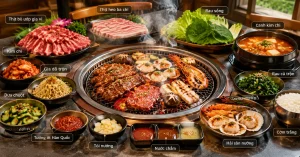
King BBQ Vincom Quảng Ngãi menu – top-notch Korean grilled flavor
King BBQ Vincom Quảng Ngãi menu – top-notch Korean grilled flavor
Article table of contents
Overview of the King BBQ Vincom Quảng Ngãi menu
Popular dishes




King BBQ Vincom Quảng Ngãi menu – top-notch Korean grilled flavor
Article table of contents
Overview of the King BBQ Vincom Quảng Ngãi menu
Popular dishes

King Pizza: A Top Pizza Brand Taking the Vietnamese Market by Storm
Table of contents
King Pizza – A symbol of modern cuisine
History and development of King Pizza
Th

Advanced Strategies with King Bot and King Flashcard
To become a master in The King of Fighters Online, mastering advanced strategies is essential

King Coffee Cappuccino: The Ultimate Flavor for Vietnamese Coffee Lovers
Discover King Coffee Cappuccino
Origins and History
Standout Features
Schedule

Is King Von a Serial Killer? Uncovering the truth and what you need to know
Article table of contents
Overview of King Von
The rumors surrounding “King

Who is the 2020 King of Rap champion?
Article table of contents
Who is the 2020 King of Rap champion?
The journey to the throne
Rap style analysis
Comparison with other Kin
This is the News Center for people who want to see the latest news right away. Which section is hot, which just went up, and which is worth reading first are all clearly separated. It looks neat even on mobile!
This page prioritizes public news, platform updates, signup gifts, first deposit promotions, weekly events, and VIP-related updates. New users only need a few seconds to know where to click.

Three featured stories for new users. One glance and you get the rhythm.

A news package for new visitors, focused on how to view information, identify priority sections, and follow updates without getting confused.
Read MoreThis news frame helps viewers understand the membership tiers being mentioned often, so they can choose the right section to read first on the page.
Read MoreSports news are gathered in one place so viewers can scan fast, filter fast, and click into the exact topic they care about.
Read MoreThe latest updated list, arranged in a mobile-friendly reading rhythm.

Quick tip for new users: check the platform introduction first, then move on to the latest news and the promotions being talked about the most.
Read MoreThe information is presented neatly, without beating around the bush. Viewers only need to scan the title and time to know whether it’s worth opening.
Read MoreSuitable for those who like to see the system’s latest changes before diving into each category.
Read MoreThis card is for people who want to quickly follow articles with high views and hot topics.
Read MoreThe reading flow is very suitable for new users: go to the right section, check the right tier, and avoid scrolling through too many pages.
Read MoreThis design makes it very convenient to read on mobile: one glance is enough to know which article to open.
Read More| Section | Quick score |
|---|---|
| Read first | Prioritize news with clear labels and the latest time. |
| New users | Start with the registration gift and the platform introduction section. |
| Follow longer | Check the VIP section, sports, and weekly updates. |
The content groups are neatly separated to make finding news faster.
Go to News to see what’s hot, switch to Sports if you like lively topics, or open the platform updates section to catch the latest changes.
Read MoreMove from News to Sports or go back to the homepage to choose the content branch that better fits your reading habits.
Read MoreThe contact page and FAQ are always available if you want to see how to use it, how to find news, or how to read new sections faster.
Read MoreWe only present what is already in the source content or public information on the site.
Headlines, posting dates, and category labels are kept easy to see so readers can catch up quickly.
News blocks are split into compact cards, avoiding long scrolling and making them easy to tap on small screens.
Continuously throughout the day, with items arranged by how new and how worth seeing they are.
Choose the category label right on the card or go into the News, Sports, and Promotions groups to filter quickly.
Yes. The card layout and labels are designed for smooth mobile browsing, so you can understand it at a glance.
The site prioritizes official news and public data, without adding details that are not in the source.
Visit the News page regularly or tap the Featured and Latest News sections to see new articles first.
Yes. You can go through Sports, VIP, Registration Bonus, or Platform Updates depending on what you want to read.
Choose a section, open a card, then go straight to the news you need.